How Can We Help?
-
Team Members
-
Clients
-
Projects
-
Tasks
-
Leads
-
Estimates
-
Invoices
-
Expenses
-
Email
-
Subscriptions
-
Accepting Payments
-
Tickets & Knowledge Base
-
Settings
< All Topics
You are here:
Print
Projects Overview
Created On
Updated
bybrian
Managing your projects is very easy and intuitive. The place to start is the Project List Page.
You access this page via the main menu:
:: Main Menu > Projects
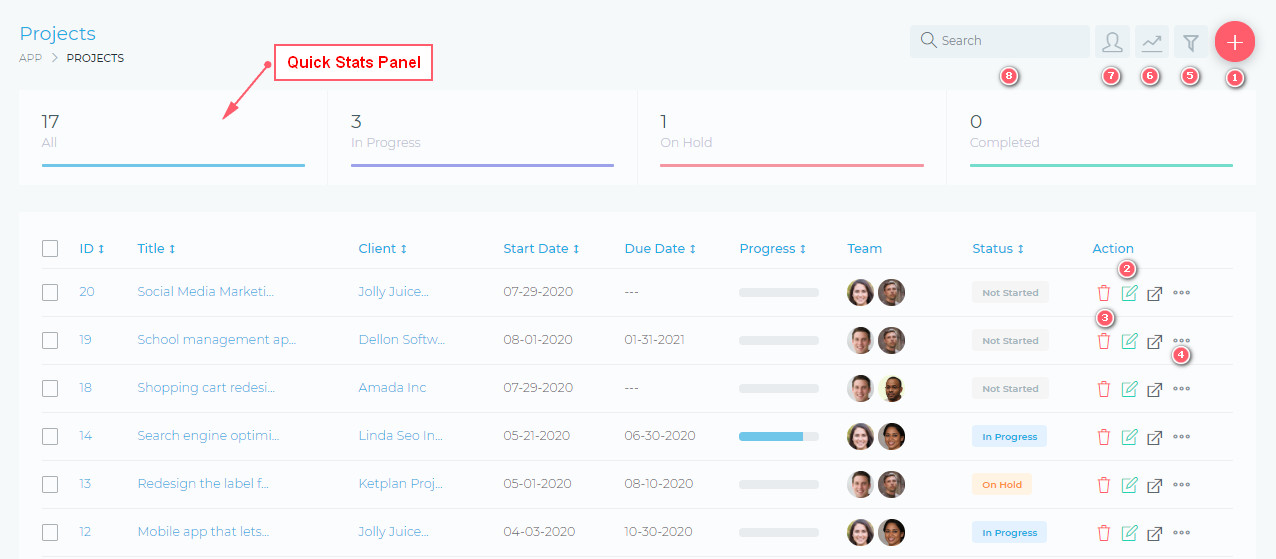
From this page, you are able to view and do the following:
- (1) Create a new project
- (2) Edit an existing project
- (3) Delete a project
- (4) Quickly manage additional project setting, via the quick actions, drop menu.
- (5) Filter projects, using a detailed filter panel. You can filter by project dates, categories, statuses, etc.
- (6) Toggle (hide/show) the Quick Stats panels
- (7) As the admin user, you can select to view all projects or only the projects that you are assigned to.
- (8) Search your projects, using the free text search box.
Table of Contents