How Can We Help?
-
Team Members
-
Clients
-
Projects
-
Tasks
-
Leads
-
Estimates
-
Invoices
-
Expenses
-
Email
-
Subscriptions
-
Accepting Payments
-
Tickets & Knowledge Base
-
Settings
< All Topics
You are here:
Print
Change/Reset Estimate Numbers
Created On
Updated
bybrian
Estimate numbers are auto-incremental. The CRM increases the invoice ID by one digit, every time a new invoice is created.
You can manually change the next estimate ID via the steps shown below.
The number that you specify is what will be used to create the next estimate ID.
In the event that you want to reset or start over from invoice ID: 0001, you must first delete all estimates in the CRM and then change the number shown in the steps below, to 1.
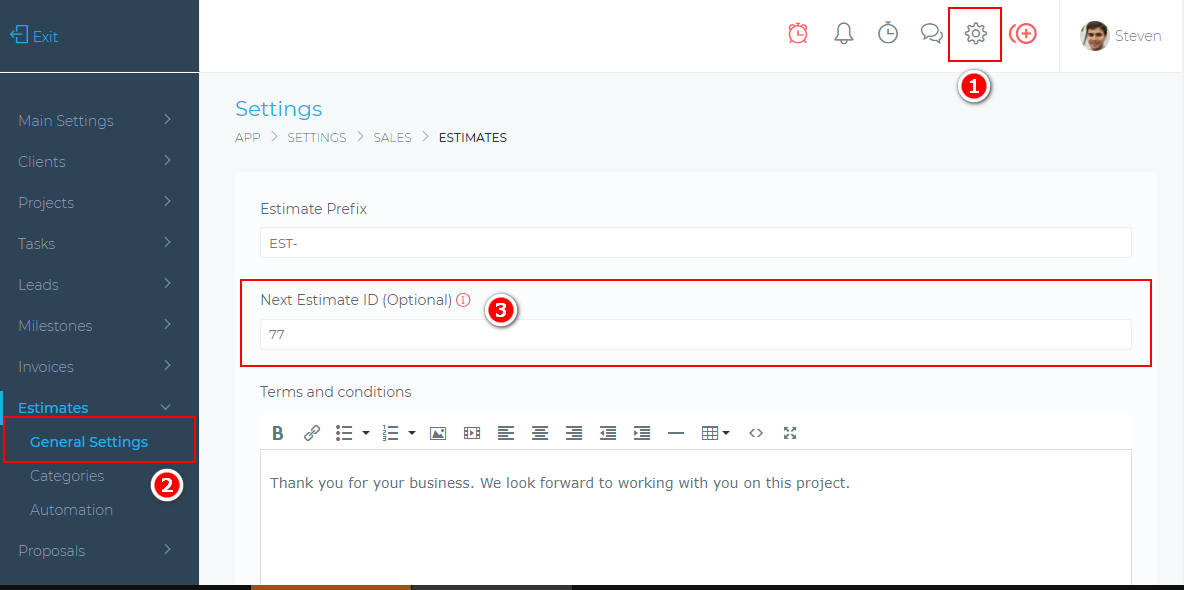
Table of Contents